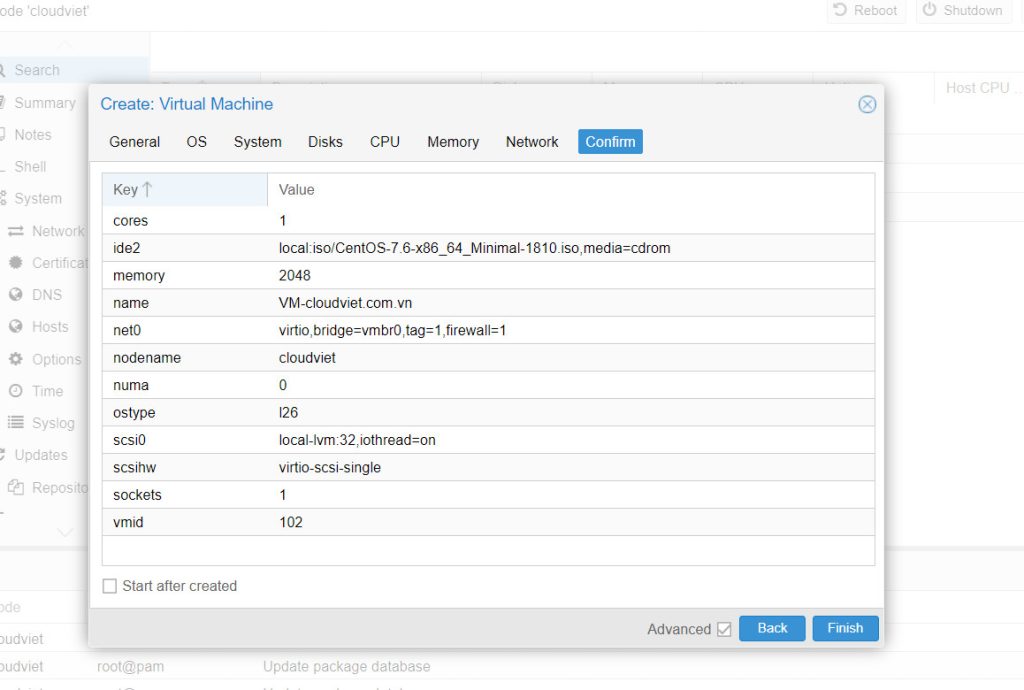
Tạo máy ảo windows trên windows server 2019
Tạo máy ảo bằng cách cài đặt Windows server 2019. Trên Powershell chạy với quyền quản trị là Admin Wie Trustly laut CasinosSofort das Online-Casino-Banking verändert hat Die Art und

Tạo máy ảo bằng cách cài đặt Windows server 2019. Trên Powershell chạy với quyền quản trị là Admin Wie Trustly laut CasinosSofort das Online-Casino-Banking verändert hat Die Art und

Cài đặt trên Powershell Windows PowerShell Copyright (C) Microsoft Corporation. All rights reserved. # install Hyper-V with admin tools PS C:UsersAdministrator> Install-WindowsFeature Hyper-V -IncludeManagementTools Success Restart Needed Exit Code Feature

Cài đặt trên Powershell Windows PowerShell Copyright (C) Microsoft Corporation. All rights reserved. # install NFS Client PS C:UsersAdministrator> Install-WindowsFeature NFS-Client Success Restart Needed Exit Code Feature Result ——- ————–

Cấu hình với Powershell Windows PowerShell Copyright (C) Microsoft Corporation. All rights reserved. # create NFS Shared Folder PS C:UsersAdministrator> mkdir C:NFSshare Directory: C: Mode LastWriteTime Length Name —- ————-

Cài đặt trên Powershell Windows PowerShell Copyright (C) Microsoft Corporation. All rights reserved. # install NFS Server with admin tools PS C:UsersAdministrator> Install-WindowsFeature FS-NFS-Service -IncludeManagementTools Success Restart Needed Exit Code

Cấu hình với Powershell trên Powershell chạy với quyền admin và cấu hình iSCSI Initiator như sau. Windows PowerShell Copyright (C) Microsoft Corporation. All rights reserved. # start iSCSI Initiator

Mở Server Manager và nhấn chọn File and Storage Services Chọn iSCSI và nhấn chọn Trên iSCSI Virtual Disk Location, chọn máy chủ và dung lượng để thiết lập ổ

Cài đặt iSCSI để cấu hình Storage Server.Một mạng để lưu trữ được gọi là iSCSI target. Một máy Client kết nối với iSCSI target được gọi là iSCSI initiator.
Thêm Computer Accounts trên CUI Chạy PowerShell hoặc Command Prompt và sừ dụng lệnh dsadd computer # show current computer list PS C:UsersAdministrator> dsquery computer -name * “CN=FD3S,OU=Domain Controllers,DC=srv,DC=world” “CN=RX-5,CN=Computers,DC=srv,DC=world”